Manage contacts, write personalized emails, and send campaigns from your computer through your own SMTP accounts. Pay once for LeoMail, without a monthly contact fee.
Trial requests are reviewed manually. We contact you by email and WhatsApp.
The LeoMail desktop app. Sending accounts are supplied by you; provider charges and limits still apply.
A different way to run campaigns
A desktop workspace with a one-time software cost.
LeoMail is for people who want to prepare and send campaigns using their own email infrastructure, without paying LeoMail a monthly subscription based on list size.
For business owners and independent marketers
Manage permission-based customer updates, announcements, and outreach from one computer.
For teams with separate workstations
Choose three or five device activations when more people need the software. Each computer has its own workspace; shared cloud editing is not included.
Know the setup before you buy
You need a supported computer, an internet connection, sending accounts, and an audience you are allowed to contact. Provider fees and sending limits still apply.
Inside the app
From your first contact list to your next campaign.
See the actual LeoMail workspace at each step. These are product screenshots, so you can understand what you are buying.
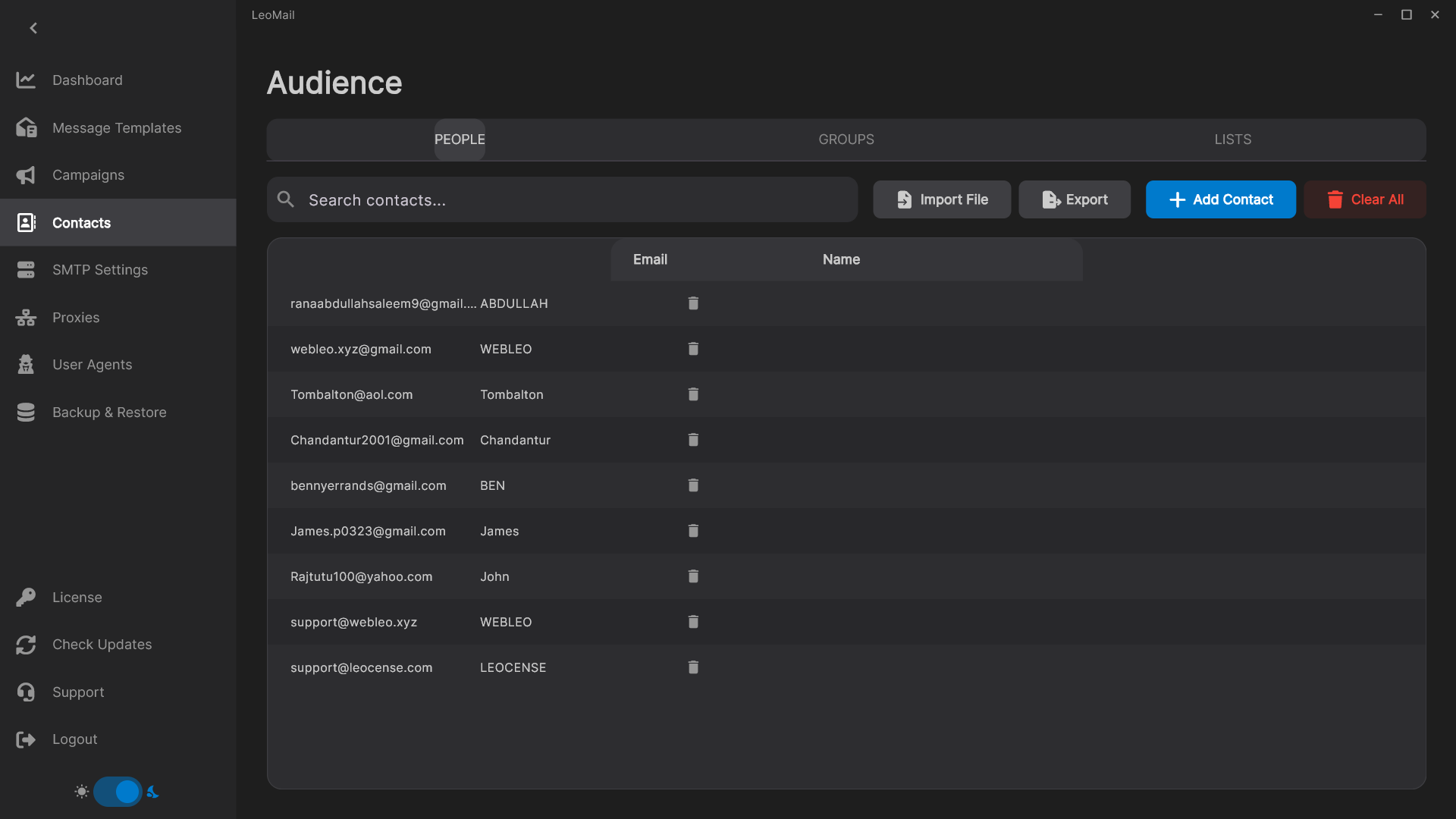
01 / Contacts
Start with the audience you already know.
Bring your contact lists into LeoMail and organize the people you intend to reach. Keep your audience in your desktop workspace, with no LeoMail fee for each stored contact.
Import your existing lists and review contact fields.
Select the audience for each campaign.
Keep permission and list quality at the centre of your workflow.
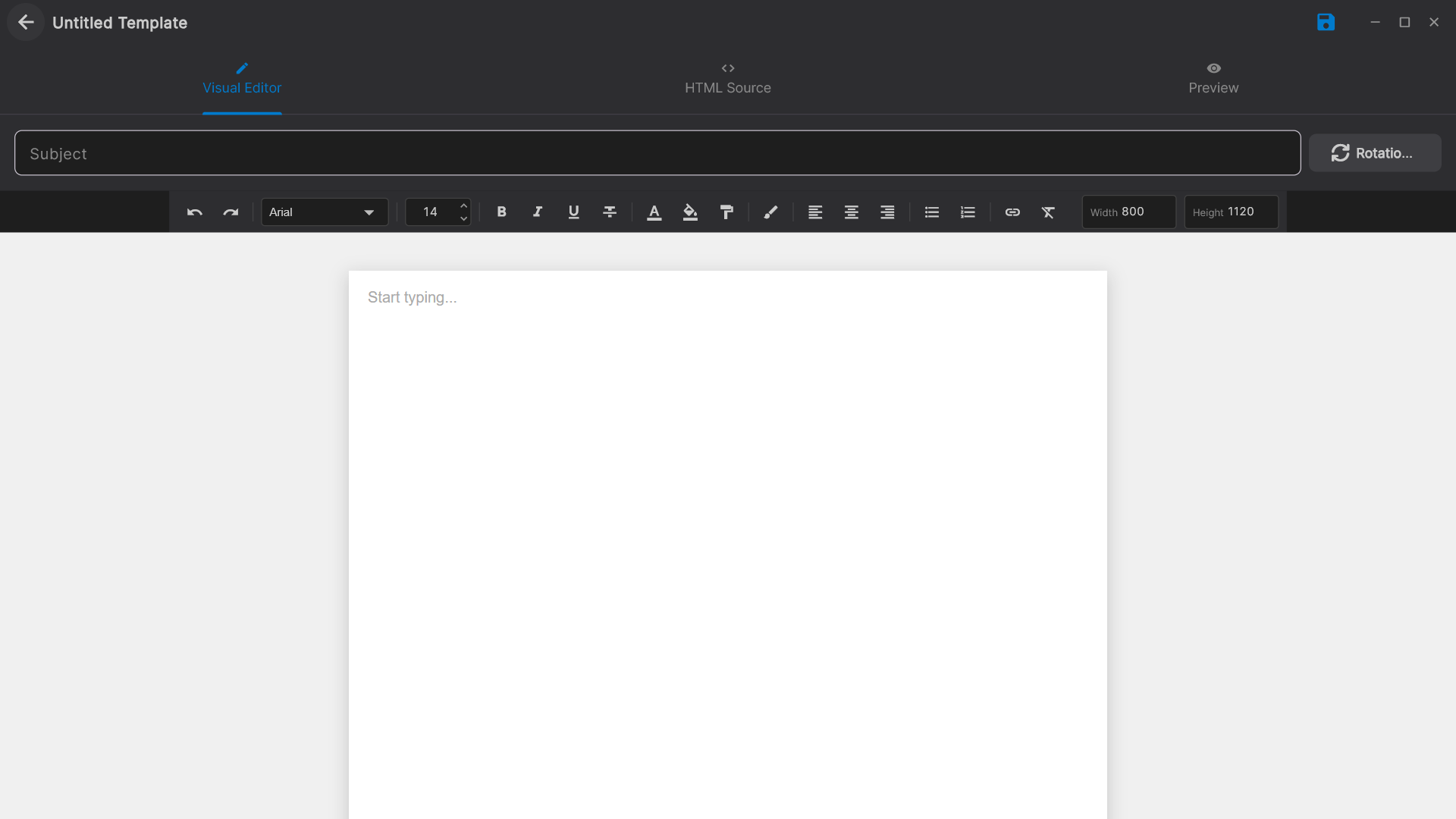
Prepare your email in the message editor, work with HTML, and use contact fields to personalize the content. Preview the result and send a test before your audience sees it.
Edit your subject and email content in one place.
Use supported personalization fields and Spintax.
Check missing fields, links, and formatting before sending.
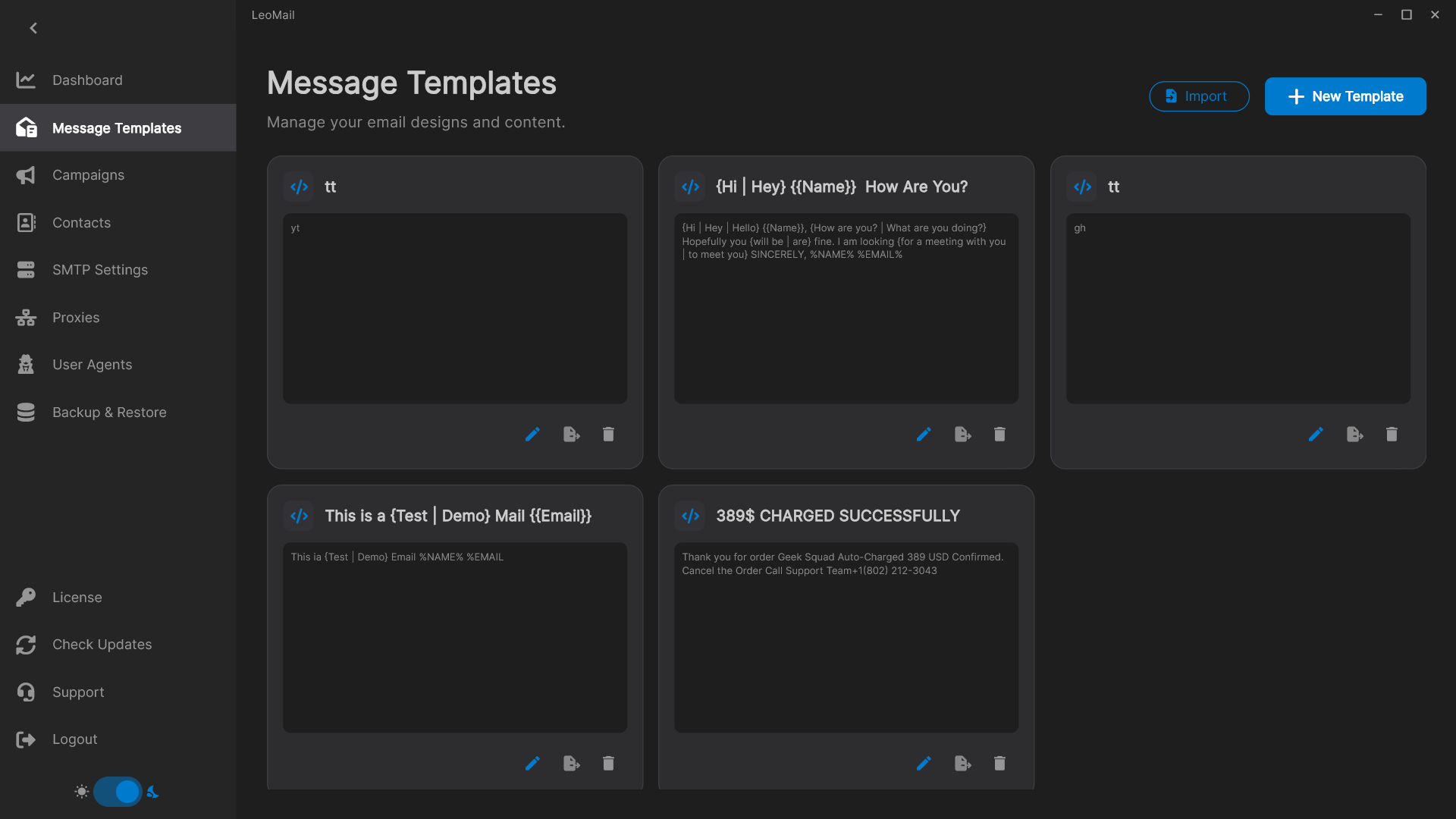
Build a reusable starting point for announcements, customer updates, and follow-ups. Your next campaign can begin with a saved message instead of an empty editor.
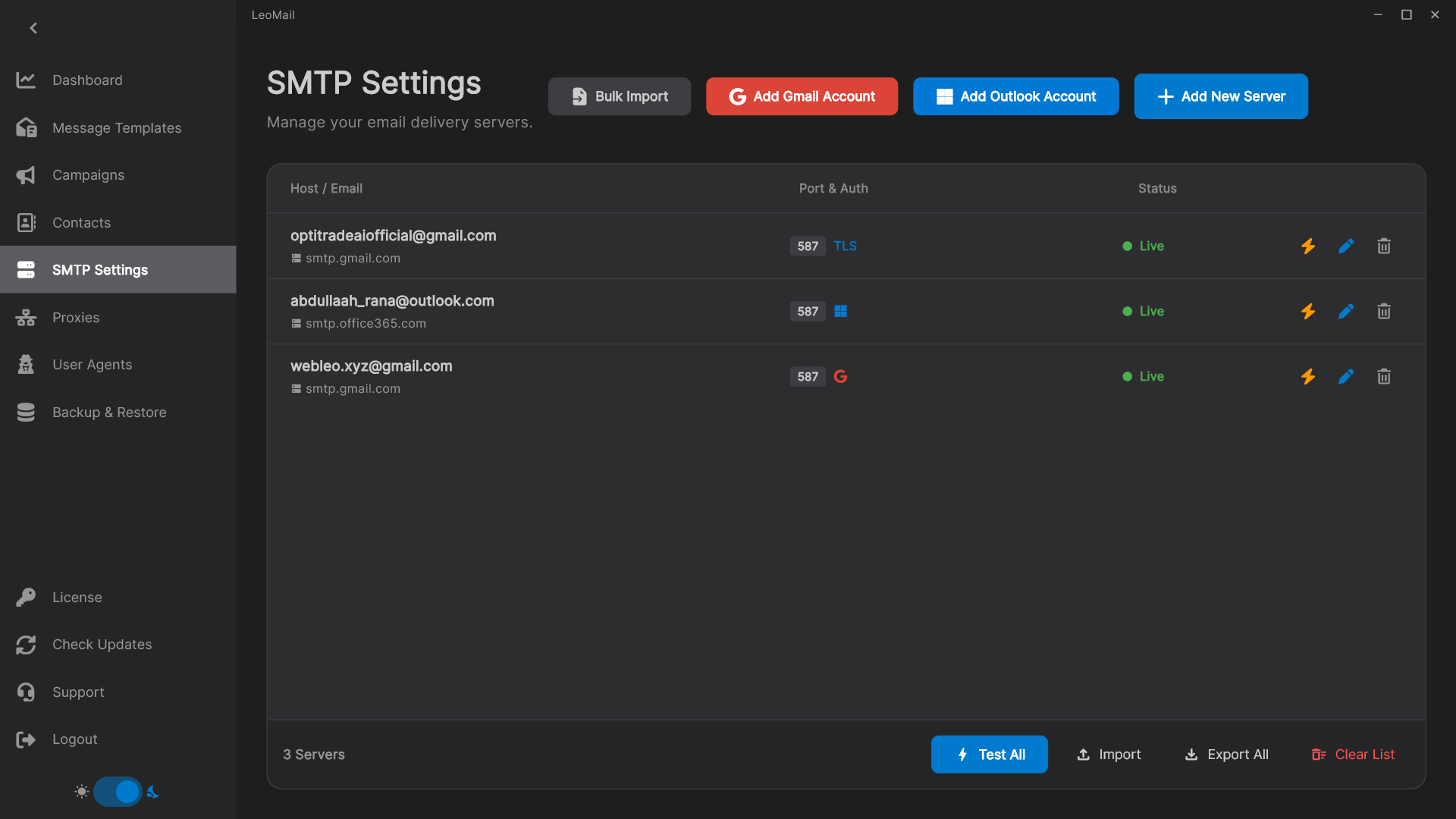
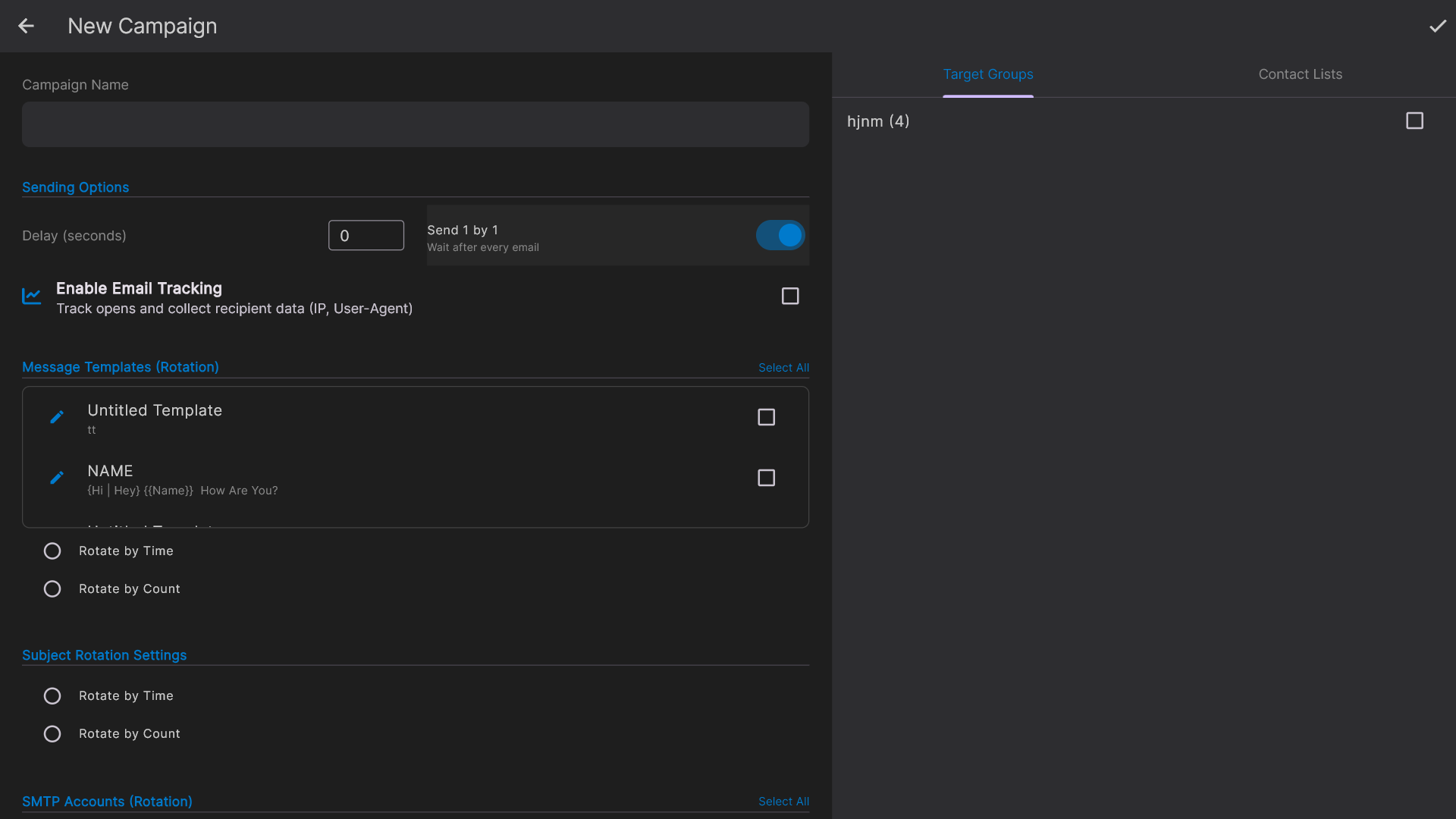
Connect your own SMTP accounts and test them before a campaign. Configure rotation and sending behaviour around the limits your providers actually allow.
Manage multiple SMTP accounts in one workspace.
Configure rotation and failover for your sending setup.
Keep your provider subscriptions and sender reputation under your control.
Bring the audience, message, and sending settings together. LeoMail runs on your computer, so you can prepare and monitor each campaign from the same workspace.
Choose the message, recipients, and sending accounts.
Review campaign settings and test the message.
Keep LeoMail open, connected, and your computer awake while sending.
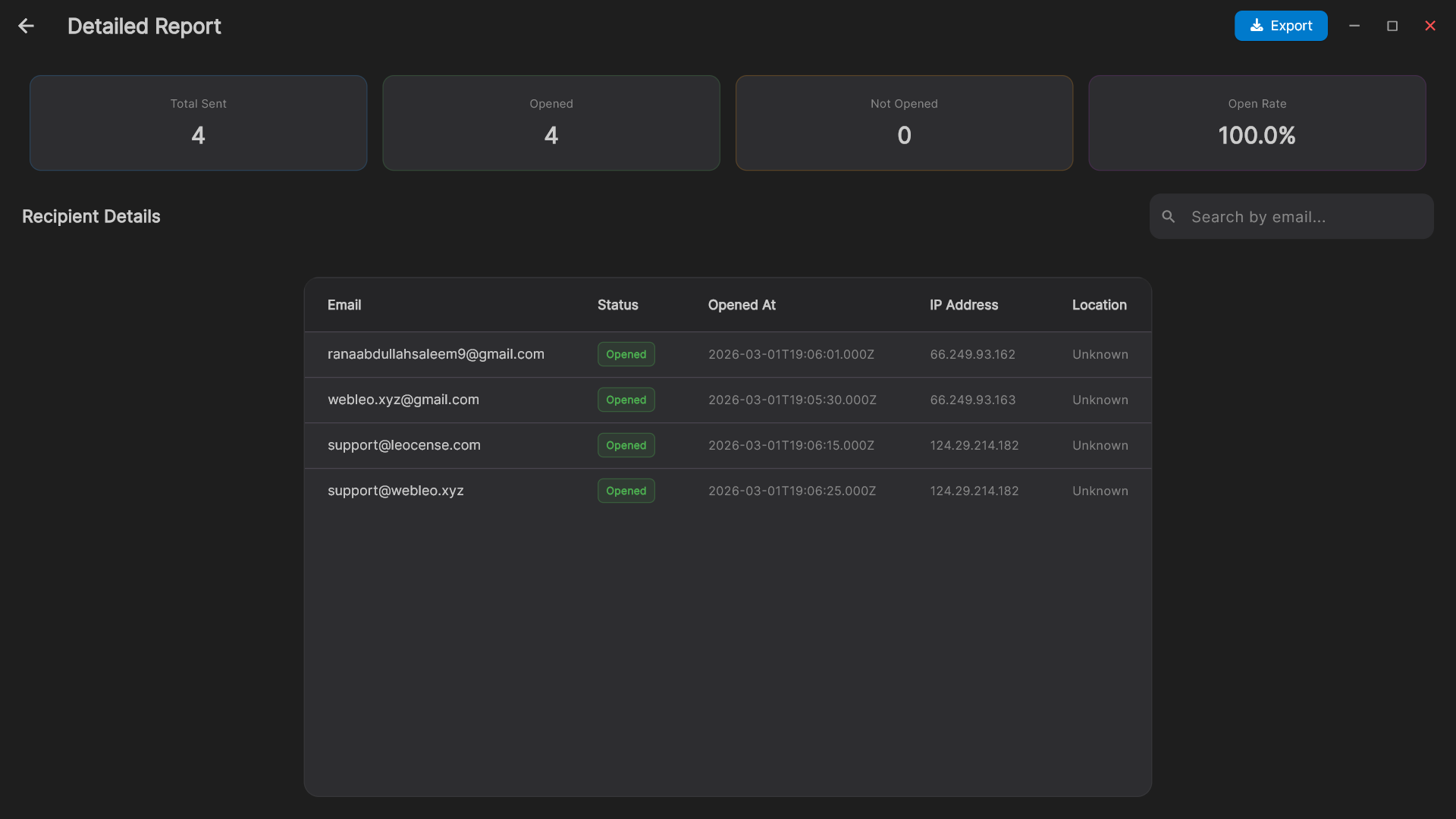
Review delivery attempts and available open and click events. Use the report to investigate failures and understand campaign activity without treating every event as a confirmed human response.
Review recipient-level sending outcomes.
Use available open and click tracking.
Remember that image blocking, privacy tools, and bots affect tracking.
Use the backup and restore tools to preserve your workspace. Make a backup before moving computers or installing a new version, and store it somewhere you can recover it.
The software does its part. Your sending setup matters too.
Good campaigns depend on more than an application. Here is the division of responsibility before you commit.
What LeoMail includes and what you provide
LeoMail provides
You provide and manage
Contact and template management
A permission-based audience and accurate contact data
Campaign preparation and SMTP sending controls
Sending accounts, provider fees, and account limits
Available send, open, and click reporting
Sender reputation, domain authentication, and campaign content
Permanent access to the purchased major version
A connected computer kept awake while campaigns run
No software can guarantee inbox placement. Follow your provider’s rules and our anti-spam policy.
Evaluate before purchasing
Use a one-day trial to check your real setup.
Request a trial, tell us what you want to test, and share your email and WhatsApp number. Our team reviews requests and follows up through both channels.
Provide a working email address and WhatsApp number. Trial access is approved manually.
Activate when you are ready to test
An approved trial lasts 24 hours from its first activation. Set aside time to connect an account and prepare a small test.
Check the workflow that matters to you
Import a small list, prepare a message, and test sending to addresses you control. Ask us about anything that needs clarification.
Compare before you choose
A one-time license. Your sending accounts. A different way to run campaigns.
If you already have email accounts and want to manage campaigns from your computer, LeoMail gives you a focused workspace without a recurring LeoMail subscription or per-contact software fee.
Where LeoMail can be the better fit
Your software license cost does not rise with every larger contact list.
You choose and manage the SMTP accounts used for your campaigns.
You work from a desktop app without installing a campaign application on a web server.
Scroll the table sideways to compare all four tools.
Software pricing models, audience costs, setup, and suitable workflows. Competitor information checked on 28 September 2026.
What matters
LeoMailDesktop campaign software
MailchimpHosted marketing platform
BrevoHosted marketing platform
SendySelf-hosted newsletter software
Software payment
$99 once for Solo, on one computer.
Monthly paid plans. Free and pay-as-you-go email-credit options are also available.
Paid subscriptions with different tiers. A free plan is also available.
$69 once for the software. Hosting and sending are additional costs.
As your audience grows
No LeoMail per-contact fee. Your sending provider’s fees and limits still apply.
Monthly pricing tiers depend on contact count and include sending limits.
Email-volume tiers also set contact-storage limits. Higher tiers can increase the subscription cost.
No recurring platform subscription. You manage hosting and Amazon SES sending costs.
Where you work
A desktop workspace. Keep the app open and your computer awake while sending.
A hosted marketing platform, accessed through your browser.
A hosted platform for email and other marketing channels.
A web application installed on your own hosting.
Sending and setup
Connect your own SMTP accounts, test connections, and configure rotation. No campaign web app to host.
Create and send campaigns within Mailchimp’s platform and plan limits.
Run campaigns through Brevo with the features and sending allowance of your plan.
Set up web hosting, PHP and a database, then configure Amazon SES.
A strong fit for
People who want a dedicated campaign app, their own sending accounts, and a one-time software purchase.
Businesses looking for hosted marketing tools, integrations, and automation.
Teams looking for hosted email and multichannel marketing in one platform.
People comfortable running a self-hosted newsletter application.
Checked 28 September 2026 against official product information. Prices are in USD; taxes and extra services may apply. These products have different feature sets. LeoMail’s one-time fee covers the purchased major version, with 6 months of standard support. SMTP fees are separate. Competitor prices and terms can change.
Compare the part of your current setup you want to improve: the software bill, control over sending, or the work needed to maintain it.
LeoMail vs. Mailchimp
Keep the software cost separate from your contact list.
Mailchimp’s monthly plans put contacts into pricing tiers with sending allowances. LeoMail’s license is based on device count, with no LeoMail per-contact charge. That makes it worth considering when you already have sending accounts and want a dedicated campaign workspace.
Choose LeoMail for a one-time desktop license and direct control of your sending setup. Consider Mailchimp when its hosted marketing tools, integrations, and automation are central to your work.
Build around the sending accounts you want to use.
Brevo combines hosted email with other marketing channels, with allowances that depend on the plan. LeoMail focuses on preparing and sending campaigns through your own accounts. You can manage multiple SMTP connections and set rotation behaviour in the desktop app.
Choose LeoMail when your priority is a focused desktop workflow with your own sending infrastructure. Consider Brevo when you need its hosted multichannel features and prefer that service model.
Get a one-time license without hosting a campaign web app.
Sendy also uses a one-time software payment. The practical difference is setup: Sendy runs on your own web hosting with PHP and a database, while LeoMail runs on your computer. With LeoMail, you manage your desktop workspace and sending accounts rather than a separate campaign website.
Choose LeoMail when a desktop setup suits your work. Consider Sendy when you want a self-hosted web application and are comfortable maintaining it. LeoMail still needs an internet connection and an awake computer while sending.
Prices are in USD. Applicable taxes are shown at Polar checkout. SMTP accounts and sending fees are separate.
Add a computer when you need it
Extra devices cost $49 each, paid once from your billing page. They do not extend your support period. Each computer keeps its own local workspace; team plans do not include shared cloud editing.
Know what stays included
Support covers setup, activation, and product troubleshooting for 6 months from first activation. Your purchased version remains available after support ends. Future major-version upgrades are not included.
Use the public download archive to find available releases, read their changes, and check file checksums. Running the app requires a license that covers that version.
Direct-purchase support starts at first paid activation and covers setup, activation, and product troubleshooting. Envato support follows the dates on your Envato purchase.
Enter the purchase code from your license certificate to receive your one-device Solo license by email. Updates for your purchased item follow Envato’s policy.
A supported computer, an internet connection, your own SMTP account, and a contact list you are allowed to email. LeoMail supplies the software; your sending provider supplies the email service and sets its limits.
Can I try it before paying?
Yes. Request a 1-day trial with your email and WhatsApp number. Our team reviews each request and contacts you through both channels. If approved, the 24-hour trial starts when you first activate the app. No payment card is required.
What does the one-time price include?
Solo is $99 for 1 computer, Professional is $199 for 3, and Business is $299 for 5. All include the same core features, permanent access to LeoMail 4.x, and 6 months of standard support. Future major-version upgrades are not included. Sending-provider charges and applicable taxes are separate.
Will my emails always reach the inbox?
No. Inbox placement depends on your sending domain, authentication, provider reputation, contact quality, and message content. LeoMail cannot guarantee inbox placement or bypass provider limits. A sent message is not proof of inbox delivery.
Does my computer need to stay on?
Yes. Keep LeoMail open, your computer awake, and your internet connection active while sending. If sending is interrupted, review campaign status before restarting. LeoMail is not a cloud service that continues sending after your computer shuts down.
Where is my data stored?
Contacts and drafts are stored on your computer. Online services are also used for licensing, sending, campaign records, unsubscribe handling, and tracking. Your sending provider processes outgoing messages. See the Privacy Policy for details.
What happens after the 6 months of support?
Your purchased version remains available. Included support covers installation, activation, feature guidance, and product troubleshooting for 6 months from first activation. It does not include campaign writing, managed sending services, or guaranteed inbox results.
Can I add or replace a computer?
Add another device to a paid license for $49, paid once, from the billing page. To replace a computer, use the Devices section of your portal to remove its activation before activating the replacement. Extra devices do not restart the support period.
Do the team plans share contacts and campaigns?
No. Professional and Business allow more computers to be activated. Each computer keeps its own local workspace; these plans do not include shared cloud editing or automatic workspace synchronization.
Can I get a refund?
Read the Refund Policy before buying. The published 7-day policy has eligibility conditions and is not an unconditional money-back guarantee. A trial lets you check your setup before purchase.
Why is WhatsApp required for a trial?
We use your WhatsApp number and email to review your request, share the decision, and provide setup instructions. Enter a number with the correct country code that you can receive messages on.
Check your setup before you commit.
Request a 1-day trial. Share your email and WhatsApp number, and our team will get back to you after review.